Saturday, June 27, 2015

Friday, June 26, 2015
Thursday, October 30, 2014
How to remove ads from KMplayer and how to disable box in KMplayer
Keep the KM Player closed & Go to Internet options you can search it in the search bar

Now click the Security tab & click on Restricted site

click the sites button and type the URL player.kmpmedia.net in that box & click add & Close.

Now open the KMPlayer and you will find no ads or adbox

Wednesday, April 16, 2014
IMPORTANCE OF MAINTAINING PRIVACY ON SOCIAL MEDIA PLATFORMS FOR IT PROFESSIONALS
IMPORTANCE OF MAINTAINING PRIVACY ON SOCIAL MEDIA PLATFORMS FOR IT PROFESSIONALS
Enabled by powerful,
easily accessible and user friendly Information Technology applications Social
media have spread across many people and organizations across many industries. (Bernoff & Schadler, 2010) Common Social media
includes blogs, microblogs, wikis, social networking sites and video-or
content-sharing sites (Piskori & McCall, 2010) which has become a
part and parcel of everyone’s life. Especially for IT professionals it plays a
major role as they always engage in their profession using computers and Mobile
phones which has easy access to these social media and even can say that they
lead the charge in the usage of these than other professionals.
Social Media and
privacy have become a controversial topic and much publicized topic since the
introduction of Social media. Day to day we see in news websites plenty of
cases of crime due to social media privacy issues. Due to this large number of
events there is a debate among public whether privacy in Social media can be
dismissed as a relic in information age because if people are ready to share
everything in Social media that means they have abandoned any reasonable
expectation of privacy (Madden, 2012) . But when we think
in another angle there maybe majority people who may involve in these
activities without a proper knowledge in Social media Privacy. In the case of
IT professionals the society recognize them as people who have a sound
knowledge about everything related to computers, internet and social media but
in reality even majority of the IT professionals are in the group who share
information in Social media without knowing about the privacy issues.
Social media has
totally changed the way how people communicate these days and IT professionals
are no exception to this. Before the Social media came up the best way for IT
professionals to meet up with their peers are professional events and industry
related organizations. But now after social media arrived IT professionals not
only could keep in touch with peers anytime but also have contact with the
extended groups of influencers who interact with those peers (Weglage, 2010) This may be very useful profession wise
to get to know people of the same area expertise and share ideas but they tend to
forget that they’re just peers not close friends whom you can share your
personal life with. Having contacts with such people through social media may
expose your family background and other personal details which may affect you
in an unexpected way in the future. This is one of the reasons an IT
Professional should maintain privacy on Social media and these kind of
situations can be prevented in Social Media like Facebook where the user can
limit and put privacy to what each person could see and have separate privacy
settings for close friends, family members and peers.
The using of social
media by employees of organizations such as IT companies have various impacts
on their company internally where it is related to organizational work and
cultures and externally where what’s the type of image the professionals create
to the outer world about the organization through social media (Kane, et al., 2009) These factors will
encourage the organization to encourage one aspect and eradicate the other this
is one of the factors that justifies the activity of IT companies controlling
the social media activities of the IT professionals. (Emmanuelle & Evgeny , 2013) The IT professionals
should understand this logic and maintain privacy on social media related to
their workplace. There are some organizations who even go to the extent of
blocking social media sites inside the organization in order to prevent privacy
issues. Not only inside office but also handling social media outside must be
taken care safely. Especially posting tweets or status updates about a project
you’re working on will may even lead your company to take legal actions against
you depending on the seriousness of the issue. In such an instance you’re
breaking the confidentiality of your job, therefore sharing work related
information on social media should be totally prohibited or must be put privacy
to close people on sites like Facebook. Sharing them in sites like twitter
isn’t safe at all as it is visible to all your followers and you don’t need a
clear identity to follow you on twitter so anyone and everyone can hide their
identity and follow your tweets. Even blogging about work you did in your
company for your company such as blogging about a program you wrote for your
company will lead you to legal issues because the rights of the program is
owned by the company and no one has rights to copyright it without permission.
So proper privacy should be maintained on professional articles published on
blogs.
Another work related
privacy mistake in Social media many IT professionals make is adding their senior
officers as friends in social media such as Facebook and Myspace. In a
situation where you can’t ignore him and is forced to add them special
attention should be made to put privacy settings in a way that won’t bring a
bad opinion or suspicion on you. In a research made recently among employees of
fortune 100 companies it’s been found that nearly 15% are guilty of sharing
work related content and sharing unprofessional photographs taken inside their
workplace been shared in social media. If these kind of material is seen by
higher officials in the workplace it may even become a threat for his job and
may even face further severe actions. Therefore when adding a higher officer
adds you in his social media network privacy controls become handy to make sure
they don’t see such content. Maybe sharing content such as CFR projects done by
the company and other achievements may give a good opinion and make believe
others that he enjoys his job and is dedicated for the growth of that entity.
IT companies are work places where you find
various types of people from various background, religion, race and political
ideas work. Studies made by Global teams on IT companies show that cultural
differences affect work ethic, method of communication, revering hierarchy and
other factors which may have negative influences on team members. (Edwards & Sridhar, 2002) When an IT
professional shares something on Facebook or twitter that is attacking a
particular race, party or religion and colleagues or higher officials who belong to that group
sees it in social media it will make a bad opinion about him. Not only a bad
opinion but it may even lead to an argument and other workers may feel awkward to
work together with him and higher officers may consider it as a black mark on
him which can affect his promotions and appraisals considering him as a person
who cannot work with a team or lead a team with different types of people. So
IT professional should be aware about what they’re sharing and privacy can be
set in a way that it won’t be visible to them.
In the present day,
Social media profiles are being used to judge a person’s character. Recruiters
checking people’s social media profiles before recruiting a person to their
company is a good example for this. This make you wonder how a person’s online
social life can be a factor in future professional life, There are situations
when finding difficulty to find the correct person among two ended up after
checking their content in social media. Currently there are no regulations to
protect job applicants from this harassment (Nicole & Matt, 2007) . The best and only
way to prevent this situation for an IT professional is to cleanup all unwanted
details in his social media content as soon as he/she sends a job application
and put privacy to content which may give a wrong idea about that person.
Especially profile pictures, cover photos should be decent content unlike
pictures of drinking and partying will create a negative opinion. LinkedIn is a
very important social media that recruiters have most interest on and it should
be up to date where they can get a good impression and correct understanding
about that person. It’s one social media that should be with less privacy and
more professional so that employers can know more about you.
It is the information
era and people should learn and get used to the different opinions on social
media and privacy related issues. Also world is too fast and busy to care for
others so your privacy should be taken care by yourself and you cannot expect
others to care for your privacy in social media. As IT professionals our
approach towards Social media privacy should be exemplary for others being
people who are more involved with computers, internet and other communication
technology.

Wednesday, February 26, 2014
North London Rivalry- Arsenal vs Tottenham Rivalry
Arsenal Vs Tottenham Rivalry (North London Rivalry)
The rivalry didn't really begin until 1913 when Arsenal moved from Plumstead to a new stadium in Highbury which was only five miles away from Spurs' ground. It meant the two teams became local rivals, and there is always animosity between local rivals in football.
Arsenal were a second division club at the time and Spurs were in the top flight, but that didn't last very long. World War One interrupted the world of football from 1914 until 1918, and when the war was over things took a turn in Arsenal's favour. There were plans to expand the first division from 20 teams to 22 teams, and Spurs hoped to stay up despite finishing 20th in the last season prior to the war.
Somehow or other Arsenal managed to take the last spot in the top flight despite the fact that they had only finished sixth in the second division in that last season before the war. There were rumours and allegations that Arsenal chairman Sir Henry Norris had used underhand dealings to obtain their promotion, but nothing was ever proven. Needless to say Spurs were far from happy with the outcome, but they soon won promotion back to the first division to set up the rivalry.
The first league encounter between the sides was in early 1921, and Spurs won 2-1 at home. After that the games between the sides became rather heated, and after a particularly vicious game in 1922 the FA threatened to make both teams play behind closed doors.
The rivalry might have become even more intense after that, but Spurs spent most of the time between 1928 and 1950 in the second division. During that time Arsenal rose to prominence in English football with six league titles to their name, while their local rivals still had none to their name. Spurs only spent two seasons in the top league in that time, and Arsenal won the title on both occasions.

ST. TOTTERINGHAM'S DAY
It is a concept thought up by Julian Shulam is given to the day each season when Tottenham no longer finish above Arsenal.
Only three times has an Arsenal Spurs game been the match that caused St Totteringham's. Two were wins, and one was a draw. They are...
- Spurs 0 - 4 Arsenal, 7th May 1927
- Arsenal 1 - 0 Spurs, 26 April 1975
- Spurs 2 - 2 Arsenal, 21 April 2007
It has happened at least once in reverse (1992/3)

ST. HOTSPUR DAY
Arsenal were humbled as Gazza returned from injury to score and inspire Spurs to a fantastic 3-1 victory on 14th april 1991 in the FA Cup semi finals game to deny Arsenal the Double. Paul Gascoigne opened the scoring with an amazing free kick, before Gary Lineker made it 2-0 shortly afterwards. Arsenal pulled one back, but in the second half Gary Lineker hit a tame shot, that was strong enough to fly through David Seaman’s hands and into the net. 3-1
Sources:
Monday, February 24, 2014
Permissions and Access Control Lists of OpenSUSE 12.2
OpenSUSE 12.2
1.1 Introduction to OpenSUSE 12.2
OpenSUSE
is an open source Linux OS distribution developed and supported by the openSUSE
Project. It is sponsored by SUSE which had been owned by Novell since 2003, but
SUSE currently operates as a standalone business unit following The Attachmate
Group's acquisition of Novell in 2011. According
to distrowatch.org it is one of the top
5 most downloaded Linux OS.
The main difference of OpenSUSE from other Linux OS is that
it is completely locked down and the developers of openSUSE is more interested
in security and because of that nothing happens within the operating system
without the express permission of the end user. OpenSUSE requires the end user
to submit a root password for almost every single task.
OpenSUSE 12.2 is one of the stable releases of openSUSE
released in September 2012 with the use of Linux 3.4 kernel & features
like KDE 4.8, GNOME 3.4,
GRUB 2 and XFCE 4.10.
1.2 Permissions of OpenSUSE
OpenSUSE
are built on top of Linux kernels & Linux systems traditionally come with 3
permission sets defined for each file object. These permissions allow or prevent others from viewing,
modifying or executing different type of files for 3 user groups file owner,
group & other.
All files and directories in a Linux system
are owned by a specific user or a group so the permissions are defined
separately for users, groups and others.
User- The username of the owner of the file
mostly by default the person who creates the file will become the owner.
Group- Group of users that own the file. All users
in that group will have the same access permissions to the file while others
can’t access it.
Other-
User who isn’t the owner of the file or belong to a group which owns the file. If
you set the permission for ‘other’ category it will apply for everyone who uses
that system.
Each
of the user types mentioned above are defined separately three types of access
permissions
Read Permission-
Files can be opened and read under this permission and in the case of a
directory you can list the contents of the directory.
Write Permission- Files
can be modified by adding new data to it and in the case of a directory you can
add, remove and rename files in the contents.
Execute Permission- Files
can be executed as a program or a shell script and in the case of a directory
you can access the files in it and enter it with the cd command.
The letters r , w, x
are used to represent this user permissions where
r- read w- write x- Execute
The image shown below represents how permissions are given to each user type in a particular system.
r- read w- write x- Execute
The image shown below represents how permissions are given to each user type in a particular system.

.png)
Image source: http://www.comentum.com/images/permissions.jpg
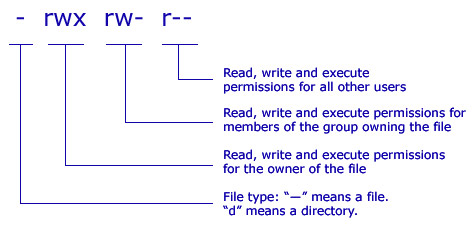
According to the
permissions allowed shown in the above image.
1. The owner of the file is given permission to read, write & execute.
2. Members of the group owning the file are allowed to only to read and write.
3. All other users are only allowed to read the files.
1. The owner of the file is given permission to read, write & execute.
2. Members of the group owning the file are allowed to only to read and write.
3. All other users are only allowed to read the files.
These
permissions can also be set using their respective octal values. The table
shown below represents the octal value given for each permissions.
.png)
chmodu+rwx,
g+rwx, o+rwx filename.txt
or
chmod 777 filename.txt
According
to the above 2 codes the permission is given to all users to read write and
execute.
Apart
from these traditional file permissions additionally there are more advanced
features such as setuid, setgid and sticky bit in openSUSE 12.2 for special
cases where the traditional systems seems too restrictive. The difference
between traditional file permissions and the other advanced system is that traditional
file permissions apply for each class of people but the setuid, setgid and
sticky bits apply for a file or directory overall.
·
The
setuid bit- setuid or set user id is a specific file
attribute that instructs the system to execute programs marked accordingly
under a specific user ID. This system will help even a normal user to use this
ID and act as root or another user temporarily.
-rwsr-xr-x 1 root shadow 80036 2004-10-02 11:08
/usr/bin/passwd
In the above code the letter ’s’ is
inserted in the owner permission which means the user who has the ID can work as the
root / owner of the file
·
The
setgid bit- setgid or set group id is a file
attribute where a program for which this bit is set runs under the group ID
under which it was saved, no matter which user starts it. By default when a new
file or directory is created under that directory it will inherit the features
of that group.
drwxrws--- 2 tux archive 48 Nov 19 17:12 backup
In
the above code the letter ‘s’ is inserted in the group permission which means
owner of the directory and members of the group may access it. Users that are
not members of the group are mapped to the respective group.
·
The
sticky bit- If this attribute belongs to a program,
a file marked in this way is loaded to RAM to avoid needing to get it from the
hard disk each time it is used. This is used rarely now as modern hard disks
are fast enough. If this attribute belongs to a directory it prevents users
from deleting, renaming or moving each other’s files except by owner of the
file.
drwxrwxrwt 2 root root 1160 2002-11-19 17:15 /tmp
.png)
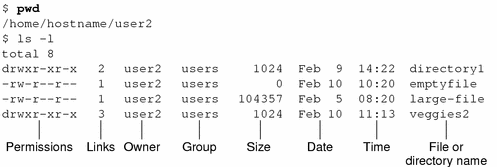
Sample set of permissions given to
files and directories
1.3 Access control lists of
openSUSE 12.2
ACLs can be divided into 2 parts
· Minimum
ACL- It comprises entries for the owner, owning group and
other which correspond to the conventional permission bits for files and
directories.
· Extended
ACL- This exceeds the minimum ACL concept. It must
contain a mask entry and may contain several entries for the named user and
named group types.

.png)


Default ACL and effects of them
Directories can have a default ACL where the subdirectories and files in the directory inherit when they are created. There are 2 ways in which the permission of a default ACL in a directory is passed to files and subdirectories
A subdirectory inherits the default ACL of the parent directory both as its default ACL and as an ACL.
· A file inherits the default ACL as its default ACL
ACL Support in Applications
ACLs
can be also used to implement complex permissions in modern day applications
but unfortunately many of those applications such as editors and file managers’
lack ACL support. Except for the star archiver, there are currently no backup
applications that preserve ACLs
1.4 YaST
module for openSUSE 12.2
The YaST module Security center and Hardening
offers a centralized security setting for openSUSE 12.2. It is used to
configure security aspects such as login procedure, password creation,
configure boot permissions and user creation along with file permissions.

|
|
Image source: http://doc.opensuse.org/documentation/html/openSUSE_122/opensuse-security/cha.security.yast_security.html
The shown in the above image displays a
comprehensive list of the most important security settings for your system. The
security status of each entry in the list is clearly visible.
The option ‘User Addition’ helps to set minimum or maximum
number of users or group IDs. This setting will be always default and doesn’t
need to be changed frequently.
File Permissions in YaST security center
OpenSUSE 12.2 comes with 3 predefined set of file permissions
for system files.
· Easy File Permission- These are suitable for standalone machines and it allows
regular users to read the files.
· Secure File Permission- These are suitable for multi user machines
with network access.
· Paranoid settings- These are the most restrictive of all and
should be handled carefully.
User Launching UpdatedB
The UpdatedB program scans the system and creates a database
of all file locations. When UpdatedB is run as user nobody, only files that are
for public users to be readable will be added to the database. When its run as
user root all files except the ones not allowed to read for the admin will be
added.
Subscribe to:
Comments (Atom)