OpenSUSE 12.2
1.1 Introduction to OpenSUSE 12.2
OpenSUSE
is an open source Linux OS distribution developed and supported by the openSUSE
Project. It is sponsored by SUSE which had been owned by Novell since 2003, but
SUSE currently operates as a standalone business unit following The Attachmate
Group's acquisition of Novell in 2011. According
to distrowatch.org it is one of the top
5 most downloaded Linux OS.
The main difference of OpenSUSE from other Linux OS is that
it is completely locked down and the developers of openSUSE is more interested
in security and because of that nothing happens within the operating system
without the express permission of the end user. OpenSUSE requires the end user
to submit a root password for almost every single task.
OpenSUSE 12.2 is one of the stable releases of openSUSE
released in September 2012 with the use of Linux 3.4 kernel & features
like KDE 4.8, GNOME 3.4,
GRUB 2 and XFCE 4.10.
1.2 Permissions of OpenSUSE
OpenSUSE
are built on top of Linux kernels & Linux systems traditionally come with 3
permission sets defined for each file object. These permissions allow or prevent others from viewing,
modifying or executing different type of files for 3 user groups file owner,
group & other.
All files and directories in a Linux system
are owned by a specific user or a group so the permissions are defined
separately for users, groups and others.
User- The username of the owner of the file
mostly by default the person who creates the file will become the owner.
Group- Group of users that own the file. All users
in that group will have the same access permissions to the file while others
can’t access it.
Other-
User who isn’t the owner of the file or belong to a group which owns the file. If
you set the permission for ‘other’ category it will apply for everyone who uses
that system.
Each
of the user types mentioned above are defined separately three types of access
permissions
Read Permission-
Files can be opened and read under this permission and in the case of a
directory you can list the contents of the directory.
Write Permission- Files
can be modified by adding new data to it and in the case of a directory you can
add, remove and rename files in the contents.
Execute Permission- Files
can be executed as a program or a shell script and in the case of a directory
you can access the files in it and enter it with the cd command.
The letters r , w, x
are used to represent this user permissions where
r- read w- write x- Execute
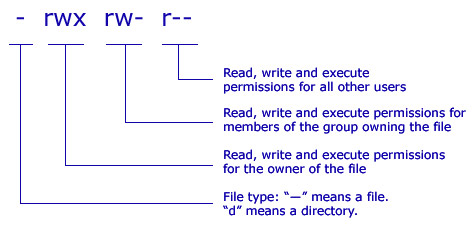
The image shown below represents how permissions are given to each user type in a particular system.
r- read w- write x- Execute
The image shown below represents how permissions are given to each user type in a particular system.
.png)
Image source: http://www.comentum.com/images/permissions.jpg
According to the
permissions allowed shown in the above image.
1. The owner of the file is given permission to read, write & execute.
2. Members of the group owning the file are allowed to only to read and write.
3. All other users are only allowed to read the files.
1. The owner of the file is given permission to read, write & execute.
2. Members of the group owning the file are allowed to only to read and write.
3. All other users are only allowed to read the files.
These
permissions can also be set using their respective octal values. The table
shown below represents the octal value given for each permissions.
.png)
chmodu+rwx,
g+rwx, o+rwx filename.txt
or
chmod 777 filename.txt
According
to the above 2 codes the permission is given to all users to read write and
execute.
Apart
from these traditional file permissions additionally there are more advanced
features such as setuid, setgid and sticky bit in openSUSE 12.2 for special
cases where the traditional systems seems too restrictive. The difference
between traditional file permissions and the other advanced system is that traditional
file permissions apply for each class of people but the setuid, setgid and
sticky bits apply for a file or directory overall.
·
The
setuid bit- setuid or set user id is a specific file
attribute that instructs the system to execute programs marked accordingly
under a specific user ID. This system will help even a normal user to use this
ID and act as root or another user temporarily.
-rwsr-xr-x 1 root shadow 80036 2004-10-02 11:08
/usr/bin/passwd
In the above code the letter ’s’ is
inserted in the owner permission which means the user who has the ID can work as the
root / owner of the file
·
The
setgid bit- setgid or set group id is a file
attribute where a program for which this bit is set runs under the group ID
under which it was saved, no matter which user starts it. By default when a new
file or directory is created under that directory it will inherit the features
of that group.
drwxrws--- 2 tux archive 48 Nov 19 17:12 backup
In
the above code the letter ‘s’ is inserted in the group permission which means
owner of the directory and members of the group may access it. Users that are
not members of the group are mapped to the respective group.
·
The
sticky bit- If this attribute belongs to a program,
a file marked in this way is loaded to RAM to avoid needing to get it from the
hard disk each time it is used. This is used rarely now as modern hard disks
are fast enough. If this attribute belongs to a directory it prevents users
from deleting, renaming or moving each other’s files except by owner of the
file.
drwxrwxrwt 2 root root 1160 2002-11-19 17:15 /tmp
.png)
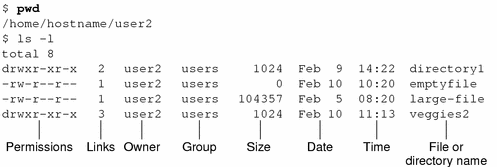
Sample set of permissions given to
files and directories
1.3 Access control lists of
openSUSE 12.2
ACLs can be divided into 2 parts
· Minimum
ACL- It comprises entries for the owner, owning group and
other which correspond to the conventional permission bits for files and
directories.
· Extended
ACL- This exceeds the minimum ACL concept. It must
contain a mask entry and may contain several entries for the named user and
named group types.
.png)
Default ACL and effects of them
Directories can have a default ACL where the subdirectories and files in the directory inherit when they are created. There are 2 ways in which the permission of a default ACL in a directory is passed to files and subdirectories
A subdirectory inherits the default ACL of the parent directory both as its default ACL and as an ACL.
· A file inherits the default ACL as its default ACL
ACL Support in Applications
ACLs
can be also used to implement complex permissions in modern day applications
but unfortunately many of those applications such as editors and file managers’
lack ACL support. Except for the star archiver, there are currently no backup
applications that preserve ACLs
1.4 YaST
module for openSUSE 12.2
The YaST module Security center and Hardening
offers a centralized security setting for openSUSE 12.2. It is used to
configure security aspects such as login procedure, password creation,
configure boot permissions and user creation along with file permissions.

|
|
Image source: http://doc.opensuse.org/documentation/html/openSUSE_122/opensuse-security/cha.security.yast_security.html
The shown in the above image displays a
comprehensive list of the most important security settings for your system. The
security status of each entry in the list is clearly visible.
The option ‘User Addition’ helps to set minimum or maximum
number of users or group IDs. This setting will be always default and doesn’t
need to be changed frequently.
File Permissions in YaST security center
OpenSUSE 12.2 comes with 3 predefined set of file permissions
for system files.
· Easy File Permission- These are suitable for standalone machines and it allows
regular users to read the files.
· Secure File Permission- These are suitable for multi user machines
with network access.
· Paranoid settings- These are the most restrictive of all and
should be handled carefully.
User Launching UpdatedB
The UpdatedB program scans the system and creates a database
of all file locations. When UpdatedB is run as user nobody, only files that are
for public users to be readable will be added to the database. When its run as
user root all files except the ones not allowed to read for the admin will be
added.



No comments:
Post a Comment